Image to 3D Model Generator Online — Hunyuan 3D & Seed3D
Turn any photo, concept art, or product image into a fully textured 3D model — or generate from a text description. AI 3D's online generator runs Hunyuan3D from Tencent and Seed 3D from ByteDance: production-grade models that deliver polygon meshes from 40K to 1.5M faces with physically-based rendering material maps included. No download, no 3D software, no topology knowledge required.
Hunyuan 3D & Seed 3D — Two AI Architectures, One Generator
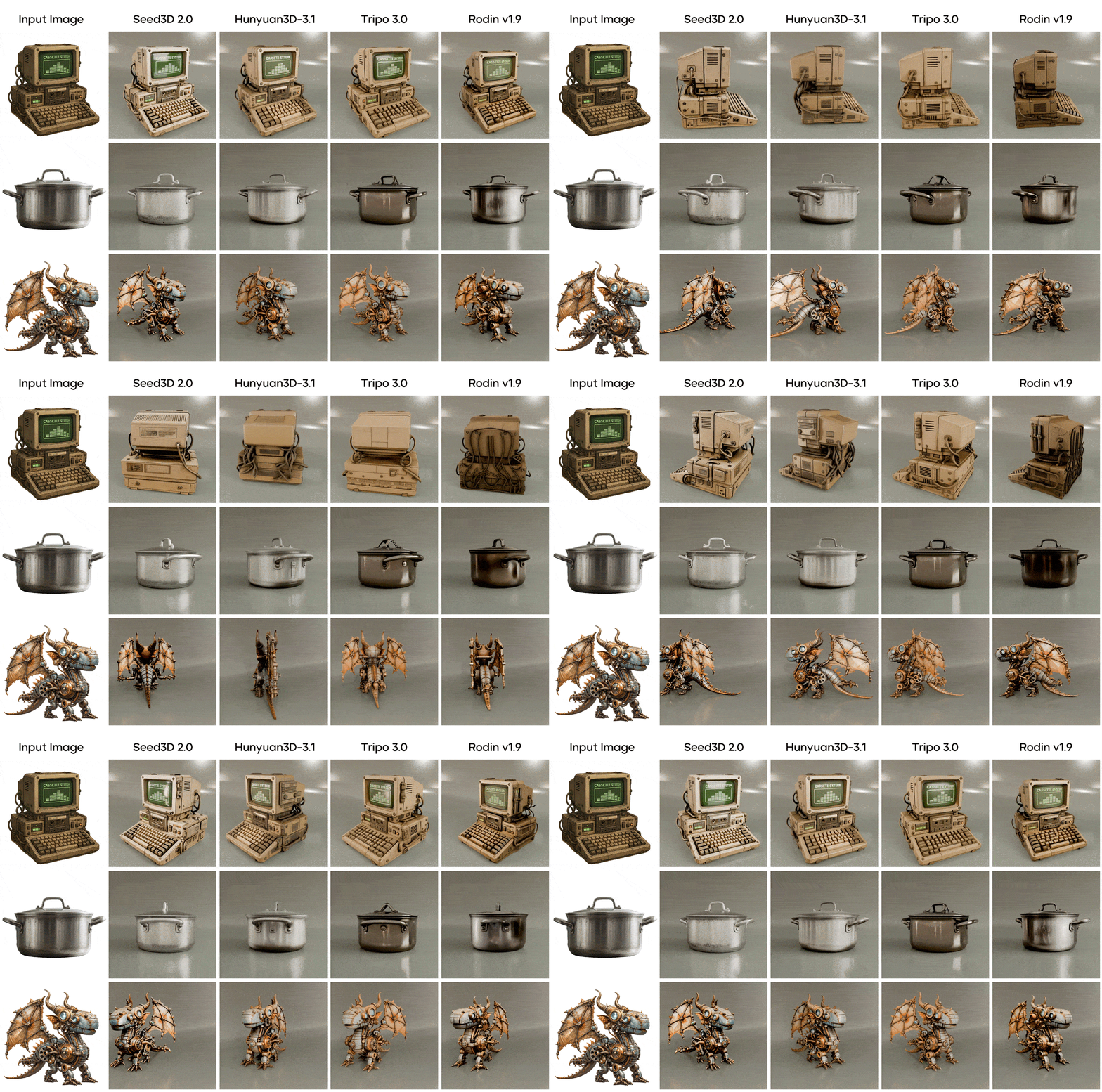
Access Tencent's Hunyuan 3D 3.1 and ByteDance's Seed3D 2.0 from the same interface. Each model has distinct strengths — run both on the same input and keep the better result.
Hunyuan 3D 3.1
Tencent · State-of-the-art image-to-3D
Hunyuan3D 3.1 generates high-fidelity 3D models using an 8-view reconstruction pipeline — processing top, bottom, left-front, right-front, and standard cardinal views simultaneously. The result is a watertight mesh with accurate geometric detail and minimal joint artifacts. Every output includes four PBR material maps: Diffuse (Albedo), Roughness, Metallic, and Normal — ready for real-time rendering in Unity, Unreal Engine, or Blender without additional baking. Face count is configurable from 40,000 (optimized for web/AR) to 1,500,000 (high-fidelity asset production). Input images up to 6MB are supported; plain or white backgrounds produce the most accurate geometry reconstruction.
Seed 3D
ByteDance · 69.0% texture win rate in human preference benchmarks
Seed3D 2.0 from ByteDance uses a two-stage coarse-to-fine Diffusion Transformer (DiT) architecture: Stage 1 generates the overall geometric structure; Stage 2 refines sharp edges and fine structures with local-aware priors and voxelized positional encoding — directly addressing the edge-softening limitation of previous AI 3D generators. Texture generation is handled by a unified PBR model with MMDiT dual-stream architecture and Mixture of Experts (MoE) detail enhancement, achieving a 69.0% win rate against mainstream industry benchmarks in human preference evaluations. Beyond image-to-3D, Seed3D 2.0 supports part-level decomposition for functional components and articulated model output in URDF format. Released April 23, 2026.
Image to 3D and Text to 3D — One Generator, Two Workflows
Upload a clear photo and AI 3D reconstructs the geometry and synthesizes PBR textures automatically — this is image-to-3D mode, the most accurate path when you have a reference. No photo? Switch to text-to-3D: describe the object in natural language and the AI generates a plausible 3D mesh from scratch. Both workflows output the same GLB format with complete PBR material maps, and both support the same polygon count range. Image mode produces more geometrically precise results for real-world objects. Text mode excels at stylized props, fantasy characters, and concept objects that don't exist to photograph.
What People Use AI 3D Model Generators For
From game asset pipelines to Shopify product pages — here are the most common real-world applications.
Game Asset Prototyping
From concept sketch to 3D prop in one session
Game designers use AI 3D to rapidly generate first-pass asset meshes for props, environment objects, and level decorations. Upload reference concept art or describe the object — generate a GLB with full PBR textures, import into Blender for retopology cleanup, then export to Unity or Unreal Engine. Cuts the ideation-to-asset cycle from days to hours for non-hero items.
3D Product Visualization
Interactive 3D and AR for online stores
Turn product photography into 3D models for Shopify, WooCommerce, or any WebGL viewer. Upload a clean product photo against a plain background — Hunyuan 3D generates a textured GLB ready for Three.js or WebXR. USDZ output lets iPhone customers view the product in AR via iOS AR Quick Look without any app download.
Photo to Printable 3D File
From real object to OBJ in minutes
Photograph an object you want to replicate or customize — a figurine, a mechanical part, a decorative piece — and generate a 3D mesh with AI 3D. Export as OBJ or GLB, then import into Meshmixer or Blender for mesh cleanup before slicing. Best for decorative items, props, and simple objects; complex mechanical parts with precision tolerances still require CAD.
GLB Assets for Web3D and AR
WebXR-ready output, no conversion
GLB is the native format for WebXR, model-viewer, and Three.js applications. AI 3D outputs GLB directly — drop the file into your Three.js scene or use Google's model-viewer web component for instant AR support on Android and iOS. USDZ export additionally enables native iOS AR Quick Look. No converter tools, no format pipeline needed.
How to Get Better Results from AI 3D Model Generation
The quality of your input determines the quality of your output — these are the settings and image choices that matter most.
Product Photo on White Background
E-commerce, prop creation
"Single white ceramic mug, centered, front-facing, lit from above, no shadows, isolated on white background — high contrast edges for geometry detection"
Character Concept Art, Single Subject
Game asset creation
"A medieval warrior in full plate armor, upright neutral pose, centered in frame — front 3/4 angle, solid light gray background, no environmental elements"
Text-to-3D for Stylized Props
Fantasy game assets, original design
"A gnarled ancient wooden staff with a glowing amber crystal at the top, runic carvings along the shaft, weathered surface, warm magical glow emanating from the gem"
Mechanical / Hard-Surface Objects
Product prototyping, industrial design
"A matte black aluminum flashlight, cylindrical body with textured grip knurling, lens cap visible — front-facing product photography angle on gray gradient background"
Input Guidelines for Best Results
- • Match face count to purpose — 40K–200K for web/AR and real-time games; 500K–700K for retopology cleanup pipelines; 1M–1.5M for high-fidelity renders and archival files
- • Normal outputs textures; Geometry is shape-only — Normal generates the full textured model, with optional PBR material maps. Geometry skips texturing entirely and returns the bare mesh — faster when you only need the shape: sculpting bases, retexturing pipelines, or prints where surface color doesn't matter. PBR switches off automatically in Geometry mode.
- • Plain background, single subject — Cluttered backgrounds confuse boundary detection — use plain white or gray; ensure the subject fills most of the frame
- • Minimum image resolution 512×512px — 1024×1024px or higher produces more accurate geometry for complex objects; PNG preserves edge sharpness better than JPG for hard-edged subjects
How to Generate a 3D Model — Step by Step
The tool is at the top of this page. Here's what each setting does and how to use it.
Prepare Your Input
For image-to-3D: upload a JPG, PNG, or WebP image within the size limit shown in the upload panel. Use a plain background and ensure good lighting — the AI uses edge contrast and surface shading to reconstruct geometry. For text-to-3D: use the prompt field. Be specific about material (metal, wood, ceramic), surface detail (smooth, textured, weathered), and overall shape.
Set Generation Parameters
Face count controls how many polygons the output mesh contains — higher values mean more geometric detail but larger file sizes. Default is 500,000 faces, suitable for most use cases. Generation type: Normal returns a fully textured model; Geometry returns the untextured mesh only — pick it when you plan to retexture or only need the shape.
Generate, Preview, and Export
Generation takes 2–6 minutes depending on input complexity and face count. Once complete, preview the 3D model in the interactive viewer — orbit, zoom, and inspect the geometry before downloading. Export as GLB for web and game engines, or OBJ for any 3D software pipeline.
More AI Creative Tools on AI 3D
Build a complete creative pipeline — from image to 3D to video, all in one platform.
Frequently Asked Questions About AI 3D Model Generation
Specific questions about how this generator works, what to expect, and how to optimize your results.
Generate Your First AI 3D Model — Free Online, No Installation
Upload an image or type a description. Set your polygon count. Click generate. The AI handles the rest — watertight mesh geometry, full PBR materials, downloadable in GLB, OBJ, or FBX, and exportable as a rotating GIF preview you can share anywhere without a 3D viewer. The generator is at the top of this page, ready to use.