Hunyuan 3D 3.1: Tencent's Production-Grade Text & Image to 3D Generator
Eight-view reconstruction, watertight meshes, and 4K PBR textures — the Hunyuan 3D release built for 3D printing and game pipelines. Generate from a text prompt or a photo, right in your browser.
Hunyuan 3D 3.1 is the production-grade release of Tencent's 3D generation model. It turns a text prompt or a reference photo into a fully textured, watertight 3D mesh with up to 4K PBR textures and as many as 1.5 million polygons — reconstructing geometry through an internal 8-view pipeline, twice as many viewpoints as the previous release. On this page you can run Hunyuan 3D directly in your browser and export the result as a GLB file, with no installation and no GPU of your own.
Why "Production-Grade" Is the Right Label
Plenty of AI 3D generators produce meshes that look convincing in a spinning preview and fall apart the moment you open them in Blender: holes at the seams, chaotic triangle soup, UV islands no human can repaint. Tencent aimed Hunyuan 3D 3.1 at exactly that gap. The official announcement called the update "a massive leap in texture fidelity and geometry precision," and the design priorities back it up — watertight output, cleaner quad-leaning topology, and smarter UV unwrapping are all features that only matter once a mesh leaves the preview window and enters a real pipeline.
Community testing has reached the same verdict from the outside. Reviewers comparing current image to 3D models consistently note that the cleanliness of Hunyuan's meshes sets the standard among hosted generators, and long-time users report that the PBR texture maps are genuinely usable in scenes rather than needing replacement. That reputation for consistency — fewer surprise artifacts, fewer regenerations — is arguably the model's biggest practical advantage.
What's New in Hunyuan 3D 3.1 vs 3.0
| Capability | Hunyuan 3D 3.0 | Hunyuan 3D 3.1 |
|---|---|---|
| Reconstruction views (internal) | 4-view pipeline | 8-view pipeline — adds top, bottom, and 45° front pairs |
| Mesh topology | Strong, occasional joint artifacts | Cleaner quad-leaning meshes, fewer artifacts at joints and thin structures |
| Watertight output | Generally good | Explicit design goal — print-ready more often |
| UV unwrapping | Standard | Smarter island layout, easier repainting |
| PBR color accuracy | Good | Measurably improved |
The view-count jump is the change you feel first. With four internal views, the model had to invent more of whatever your photo never showed; with eight — front, back, left, right, top, bottom, plus two 45-degree positions — the reconstruction covers far more of the object's surface before any guesswork begins. For product scans and figurine reproduction, that is the difference between "close enough" and "matches the reference."
Text to 3D or Image to 3D — Two Entry Points
Hunyuan 3D 3.1 is one of the few current-generation models that treats text to 3D as a first-class input rather than an afterthought. Describe a single object in up to 1024 characters — its shape, materials, and style — and the model generates the mesh from scratch. This is the faster path when no reference exists yet.
The image to 3D path accepts a photo or rendering up to 6MB and reconstructs the object it shows. It is the right entry point whenever fidelity to something real matters: e-commerce product shots, concept art handed off by an illustrator, or a physical prop you photographed on a table. The 8-view pipeline then takes that single photo and rebuilds the geometry from eight inferred viewpoints — which is why a clear, well-lit source image pays off so directly in the final mesh.
What It Delivers in Real Use
On AI 3D, a typical Hunyuan 3D 3.1 generation lands in the 2–6 minute window, with face count and input complexity deciding where in that range you fall. The face count slider spans 40,000 to 1.5 million polygons (defaulting to 500,000), and the generator offers two generation types — full textured output, or bare geometry only — so you skip the texturing stage entirely when all you need is the shape.
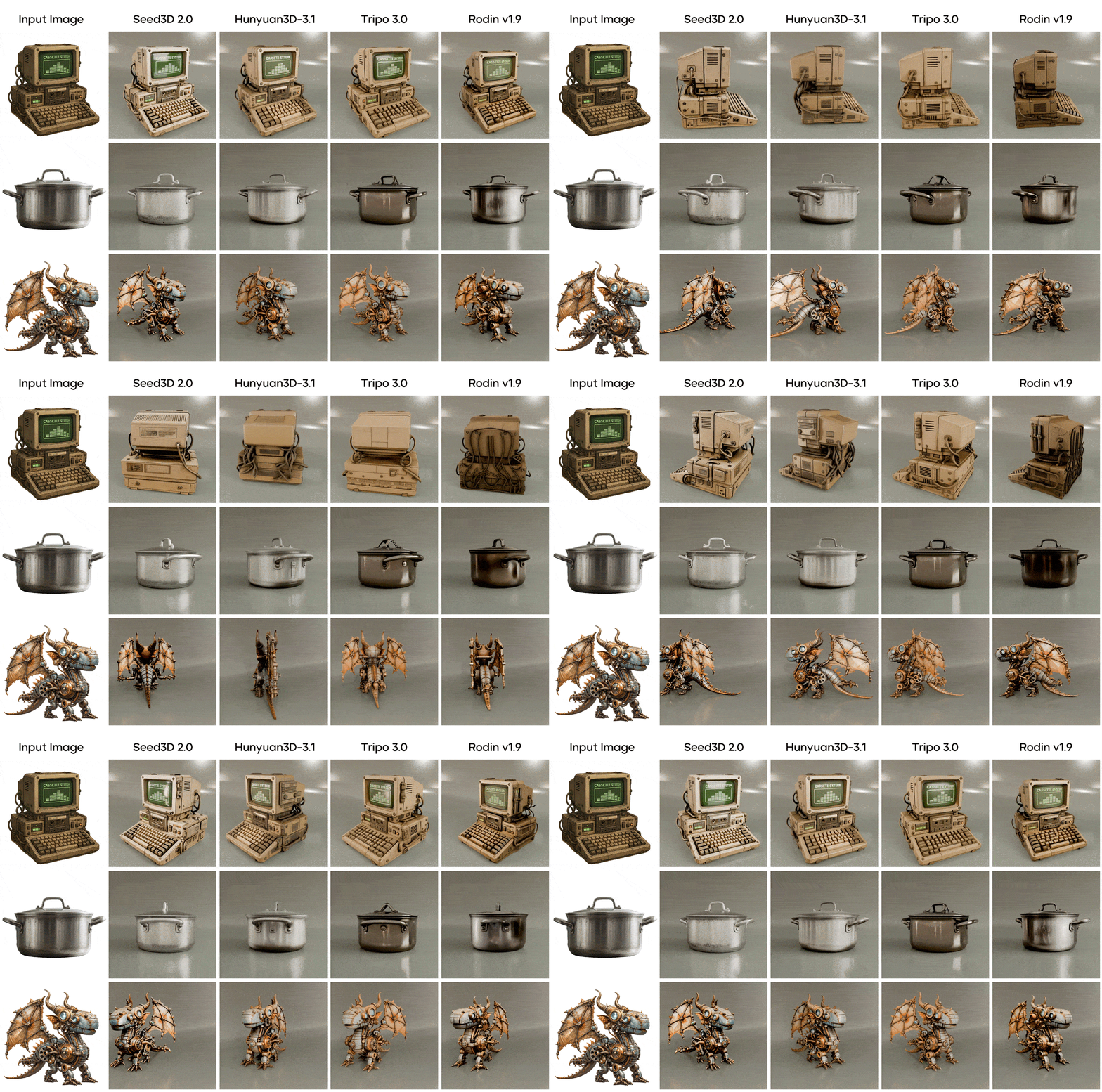
The output preview is a fully interactive 3D viewer: rotate, zoom, and inspect the mesh from any angle before downloading. Exports are GLB with the PBR texture set embedded, so the file you download is the file you import.
Where Hunyuan 3D 3.1 Fits Best
3D printing. Watertight geometry is the model's signature strength, and it is precisely the property slicers demand. Generate at a high face count, check thin structures in the preview, and send the GLB to your slicer via a quick format conversion. The common mistake is printing from a low face count — detail you removed at generation cannot be recovered by the printer.
Game-ready hero assets. The quad-leaning topology and 4K PBR maps give character and prop artists a serious head start. Generate near the default face count, retopologize to your engine budget, and keep the generated textures — users consistently report they hold up in-engine. Dropping a raw 1.5M-polygon mesh into a level is the error to avoid.
Product visualization. Photograph a product against a plain background, feed the photo in, and get a mesh faithful enough for configurators and AR previews. This is the use case where the 8-view pipeline pays for itself most directly — the sides your camera never saw come back plausible instead of invented.
Characters and creature sculpts. Tencent highlights sculpt-level detail in this release — silhouettes and surface flow on figures hold up far better than in earlier generations.
Limitations Worth Knowing
It is not the fastest option. Minutes-per-mesh is the cost of production-grade output. When you are still exploring whether a concept reads at all, iterate on a faster model first — Trellis 2 runs on this site too and excels at rapid single-image validation — then bring the winning concept here for the final asset.
Hidden sides are inferred. The model must reason about everything your camera never saw. Usually it reasons well; when the hidden side carries important detail, it guesses. The fix is in the framing: choose the angle that shows what matters most — a three-quarter view usually carries the most geometric information per pixel.
No downloadable weights. The 3.x line is a hosted model, not an open-source release. If self-hosting open weights is a hard requirement, Trellis 2's MIT license is the alternative — for everyone else, running Hunyuan 3D in the browser here skips the infrastructure question entirely.
Hunyuan 3D 3.1 vs Trellis 2 vs Seed 3D 2.0
| Hunyuan 3D 3.1 | Trellis 2 | Seed 3D 2.0 | |
|---|---|---|---|
| Developer | Tencent | Microsoft Research | ByteDance |
| Inputs | Text or single image | Single image | Text + image |
| Geometry priority | Watertight, pipeline-ready | Arbitrary topology, open surfaces | Speed-first concepting |
| Textures | Up to 4K PBR | Full PBR including opacity | Solid PBR |
| Strongest at | Printing, game pipelines, hidden-surface fidelity | Tricky topology, transparency, raw speed | Quick ideation rounds |
If the question is "which one produces a mesh I can print or ship with the least cleanup," Hunyuan 3D 3.1 is the strongest answer of the three. If the object involves open surfaces like cloth, foliage, or glass-like transparency, Trellis 2's representation handles what watertight-first models cannot. Seed 3D 2.0 earns its place when you want several rough takes in the time one refined mesh would cost. All three run on the same generator page here, so switching is a dropdown, not a migration.
Prompt & Input Playbook
For text to 3D prompts, three rules cover most failures. Describe one object, not a scene — "a weathered bronze astronaut helmet with engraved star patterns" beats anything containing "standing in a room." Name materials explicitly, because words like bronze, walnut, or frosted glass drive both geometry and PBR maps. State a style register — photorealistic, stylized, low-poly — or the model will pick one for you.
For image inputs, isolate the subject. Clean or plain backgrounds, even lighting without harsh shadows, and the full object in frame (no cropped edges) measurably improve reconstruction. Reflective and transparent objects photograph deceptively; matte references reconstruct more faithfully.
For the source photo itself, angle is leverage: a three-quarter view that shows the front and one side at once gives the 8-view pipeline the most geometry to anchor on. Keep the object centered, fill the frame without cropping edges, and avoid extreme close-ups — five seconds of repositioning saves a regeneration cycle.
From Prompt to GLB in Minutes
Open the generator, pick Hunyuan 3D 3.1, and either type a prompt or upload your reference image. Choose textured or geometry-only output, set the face count for your target use, and generate. Inspect the interactive preview from every angle, then export the GLB — textures included — into Blender, Unity, Unreal, or your slicer of choice.
Frequently Asked Questions
Start Creating with Hunyuan 3D 3.1 Today
Transform your creative ideas into stunning content. No technical expertise required.
Generate a 3D Model Now