Trellis 2: Run Microsoft's Open-Source Image to 3D Model Online
TRELLIS.2 turns a single photo into a fully textured 3D asset with PBR materials — including transparency. Skip the Linux-plus-24GB-GPU setup and run it straight from your browser.
TRELLIS.2 — usually written Trellis 2 — is a 4-billion-parameter image to 3D model released in December 2025 by researchers from Microsoft Research, Tsinghua University, and USTC. Its core invention, a field-free sparse voxel representation called O-Voxel, lets one model generate what 3D generators have historically refused: open surfaces like cloth and leaves, non-manifold geometry, enclosed interior structures, and full PBR materials including real transparency. On this page you can run Trellis 2 online and export GLB files from a single photo — no Linux box, no 24GB GPU, no setup.
Why Trellis 2 Took Over 3D Generation Almost Overnight
Open releases of this caliber are rare, and the numbers showed it immediately: within months of release, the TRELLIS.2-4B weights were being downloaded from Hugging Face at a rate of over a million per month, with around a hundred public Spaces built on top and the ComfyUI ecosystem wiring it into node workflows within days. Community sentiment converged quickly on the same two reasons — the MIT license made it genuinely free to build on, and the output quality crossed a line that previously required closed commercial models.
There is an irony in those download numbers, though. The official requirements — Linux, an NVIDIA GPU with 24GB or more of memory, CUDA 12.4 — mean most of the people excited about Trellis 2 cannot actually run it on their own hardware. That gap between "open to everyone" and "runnable by few" is exactly what hosted access closes, and it is why this page exists.
What's New vs the Original TRELLIS
The first TRELLIS, a CVPR Spotlight paper from Microsoft, encoded objects as structured latents bound to field-based 3D representations. It was a breakthrough with a built-in ceiling: field-based approaches assume closed surfaces, so cloth, foliage, hollow interiors, and anything non-manifold either failed or got silently "solidified" during conversion.
Trellis 2 removes that ceiling rather than raising it:
- O-Voxel replaces field-bound latents. Geometry and appearance are stored directly in a sparse voxel structure with roughly 16× spatial compression — no lossy field-to-mesh conversion in the loop.
- The generator scales to 4 billion parameters with a flow-matching transformer, a significant capacity jump over the original.
- Appearance becomes full PBR. Base color, roughness, metallic, and — uniquely among mainstream generators — opacity, so transparency is modeled rather than faked.
- Resolution becomes a dial, with 512³, 1024³, and 1536³ generation tiers replacing one-size-fits-all output.
One correction worth making explicitly, because it spreads widely in forum posts: multi-image conditioning was an original-TRELLIS feature, and many writeups carried it over to the sequel by assumption. The published Trellis 2 pipeline is single-image. If the unseen sides of your object matter most, Hunyuan 3D 3.1 on this site reconstructs its single input through an internal 8-view pipeline — a stronger fit for that brief.
Geometry Other Generators Refuse
The shortest honest pitch for Trellis 2 is a list of objects you have probably watched other models butcher. A jacket — open surfaces with two distinct sides. A houseplant — dozens of thin alpha-masked leaves. A glass bottle — transparency plus an interior. A mechanical assembly with internal cavities the camera never saw but the structure implies.
Watertight-first models handle these by closing them: the jacket becomes a jacket-shaped shell, the leaves merge into green blobs, the bottle turns opaque. Trellis 2's representation simply does not require surfaces to enclose volume, so it reproduces the object as it is. If your asset library leans organic, botanical, fashion, or transparent, this single property outweighs every other spec on the sheet.
Resolution Tiers — and the Honest Numbers Behind "Fast"
Microsoft's published benchmarks are striking: on an H100, raw inference takes roughly 3 seconds at 512³, about 17 seconds at 1024³, and around 60 seconds at 1536³, with shape and material stages counted together. Those figures are real, but they are bare-metal numbers on a flagship datacenter GPU — not what any hosted service delivers end to end once queueing, decoding, and export are counted. On AI 3D, a typical Trellis 2 job completes within a 2–6 minute window. Knowing both numbers tells you what you are actually buying: one of the fastest current 3D generators, measured honestly.
The tier system rewards a two-pass habit: draft at 512³ to confirm the image reconstructs well, then re-run the keeper at 1536³ with texture size raised toward 4096 for hero assets. A polygon-reduction control rounds out the dials, letting you target anything from web-viewer budgets to sculpt-density meshes.
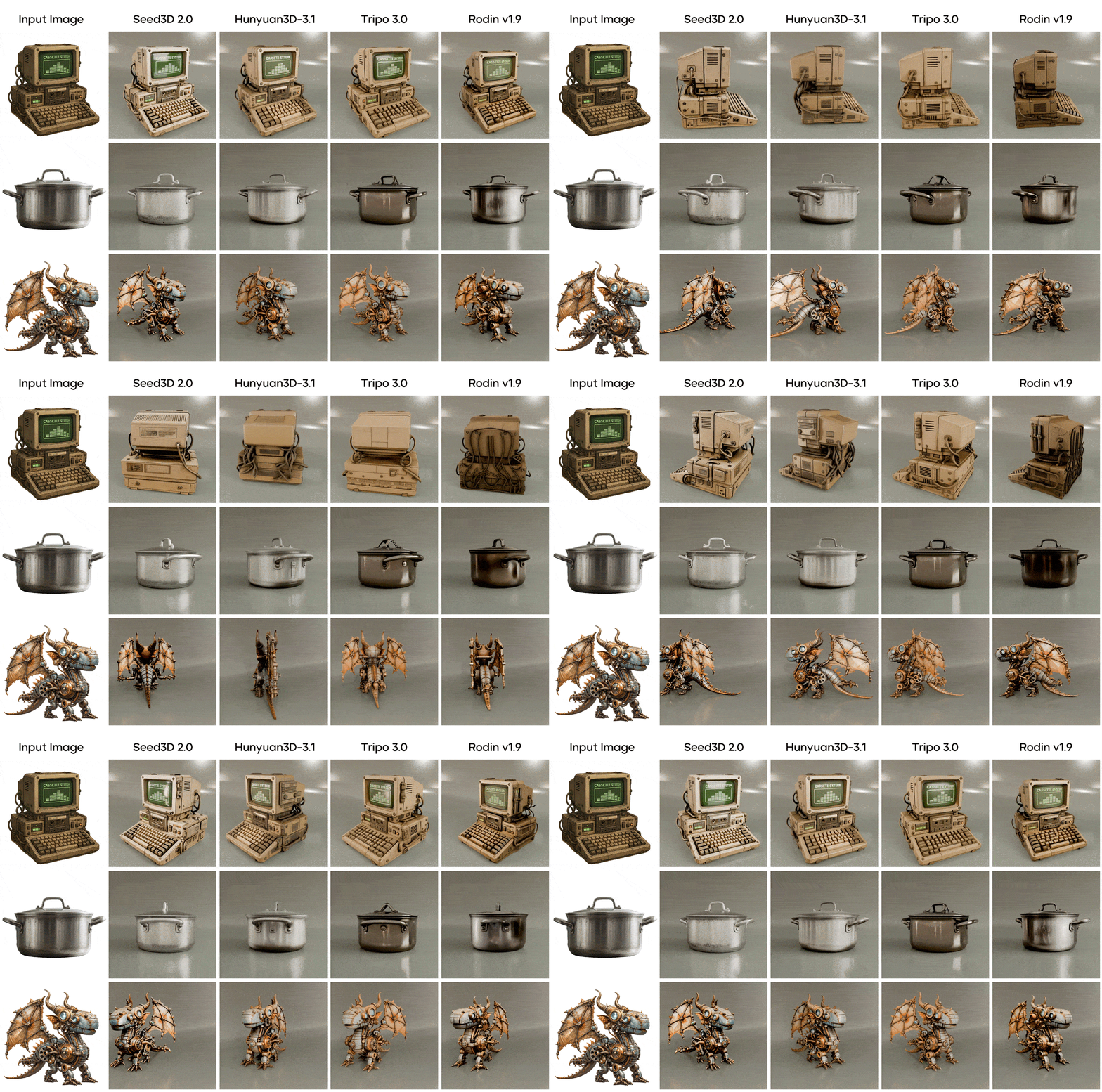
Limitations to Plan Around
Small holes happen. The official model card states plainly that meshes may contain small holes and recommends post-processing where watertightness is required. For occasional prints, a mesh-repair pass fixes it; if printing is your main workload, generate on Hunyuan 3D 3.1 instead, where watertight output is a design goal rather than a repair step.
One image means one viewpoint of truth. Everything the photo does not show, the model infers from learned priors. It infers well, but a distinctive logo on the back of an object will not invent itself — choose the angle that shows what matters most, or run it through Hunyuan 3D 3.1, whose internal 8-view pipeline recovers hidden surfaces more faithfully.
No text mode. Trellis 2 does not accept prompts. The practical bridge: generate a reference with the AI image generator, approve it visually, then convert it here. Slightly longer path, strictly more control.
Trellis 2 vs TRELLIS 1 vs Hunyuan 3D 3.1
| TRELLIS (original) | Trellis 2 | Hunyuan 3D 3.1 | |
|---|---|---|---|
| Representation | Structured latents over fields | O-Voxel, field-free | Multi-stage reconstruction |
| Topology | Closed surfaces | Arbitrary — open, non-manifold, interior | Watertight by design |
| Materials | Color-focused | Full PBR including opacity | Up to 4K PBR |
| Inputs | Image, incl. multi-image | Single image | Text or single image |
| License / access | MIT, open | MIT, open — heavy hardware | Hosted platform model |
Against its predecessor, Trellis 2 is a clean generational win — more topology, more material channels, more resolution. Against Hunyuan 3D 3.1, it is a genuine fork in priorities: representational freedom and speed on one side, pipeline-ready watertight discipline and hidden-surface fidelity on the other. Both run from the same dropdown on the generator page, which turns the comparison from a purchasing decision into a per-asset choice.
Input Playbook: One Photo Decides Everything
With a single-image model, input quality is not a factor — it is the ceiling. Five rules capture most of the gap between mediocre and excellent results. Use the highest-resolution image you have; detail the photo lacks cannot reappear in 3D. Light evenly, because baked-in harsh shadows read as geometry and emboss themselves into the surface. Keep the background plain so segmentation spends its accuracy on the object. Frame the entire object — cropped edges become amputated geometry. And pick the information-richest angle, typically a three-quarter view showing front and side simultaneously, rather than a flat head-on shot.
On the parameter side: 512³ while iterating, 1536³ for the final, texture size matched to camera distance — 1024 for background props, 4096 for close-ups — and polygon reduction set to your engine budget rather than maximum.
From Photo to GLB in Three Steps
Open the generator and select Trellis 2. Upload your image — JPG or PNG up to 10MB — and set resolution, texture size, and polygon target. Generate, inspect the result in the interactive viewer, and export a GLB with full PBR materials, transparency included, ready for Blender, Unity, Unreal, or the web.
Frequently Asked Questions
Start Creating with Trellis 2 Today
Transform your creative ideas into stunning content. No technical expertise required.
Turn an Image into 3D